63 subsidiaries, 63 IT environments shaped by years of growth, and one urgent goal: establish clear rules for access rights without restricting the flexibility of individual locations.
Our customer, a German industrial group in the raw materials sector, achieved this goal with the FirstWare IDM-Portal. Identities and relevant attributes from Microsoft Entra ID, Active Directory, Keycloak, and other systems were brought together centrally and used to automatically assign appropriate roles and groups.
The result was a consistent, rule- and attribute-based permissions management system that takes different technical target systems into account and grants users precisely the rights they need for their role, location, and area of responsibility.
Inhaltsverzeichnis
Starting point: Many locations, many different approaches
Over the years, the group had grown through acquisitions, new companies, and the integration of additional subsidiaries. Each new organizational unit brought its own IT structures, naming conventions, processes, and administrative responsibilities.
This led to two opposing problems:
On the one hand, individual internal IT teams and external service providers had very extensive permissions.
On the other hand, even simple administrative tasks often had to be handled by central IT.
The result was unnecessary delays, extensive coordination, and full access rights that had accumulated over time. The key challenge was to create permissions management that enables local responsibilities while preventing unnecessary full admin rights.
The solution: Centralized permissions management with fine-grained delegation
Instead of continuing to assign permissions to individuals or confusing ad hoc groups, the group opted for a centrally managed role model in the FirstWare IDM-Portal.
The role logic takes into account both organizational attributes and specific administrative actions.
For example, a role defines:
- which companies or locations are visible,
- which identities can be managed,
- which attributes can be viewed or changed,
- which group memberships can be modified,
- which processes can be started,
- which identity sources can be accessed, and more.
This role model goes well beyond the simple question of whether someone is an “administrator” or “not an administrator.”
Here is an example featuring Karla Armin, an IT employee. As the helpdesk contact for the “Univice AG” company at the “Frankfurt” location, she can only manage employees whose profiles list “Company = Univice AG” and “City = Frankfurt.”
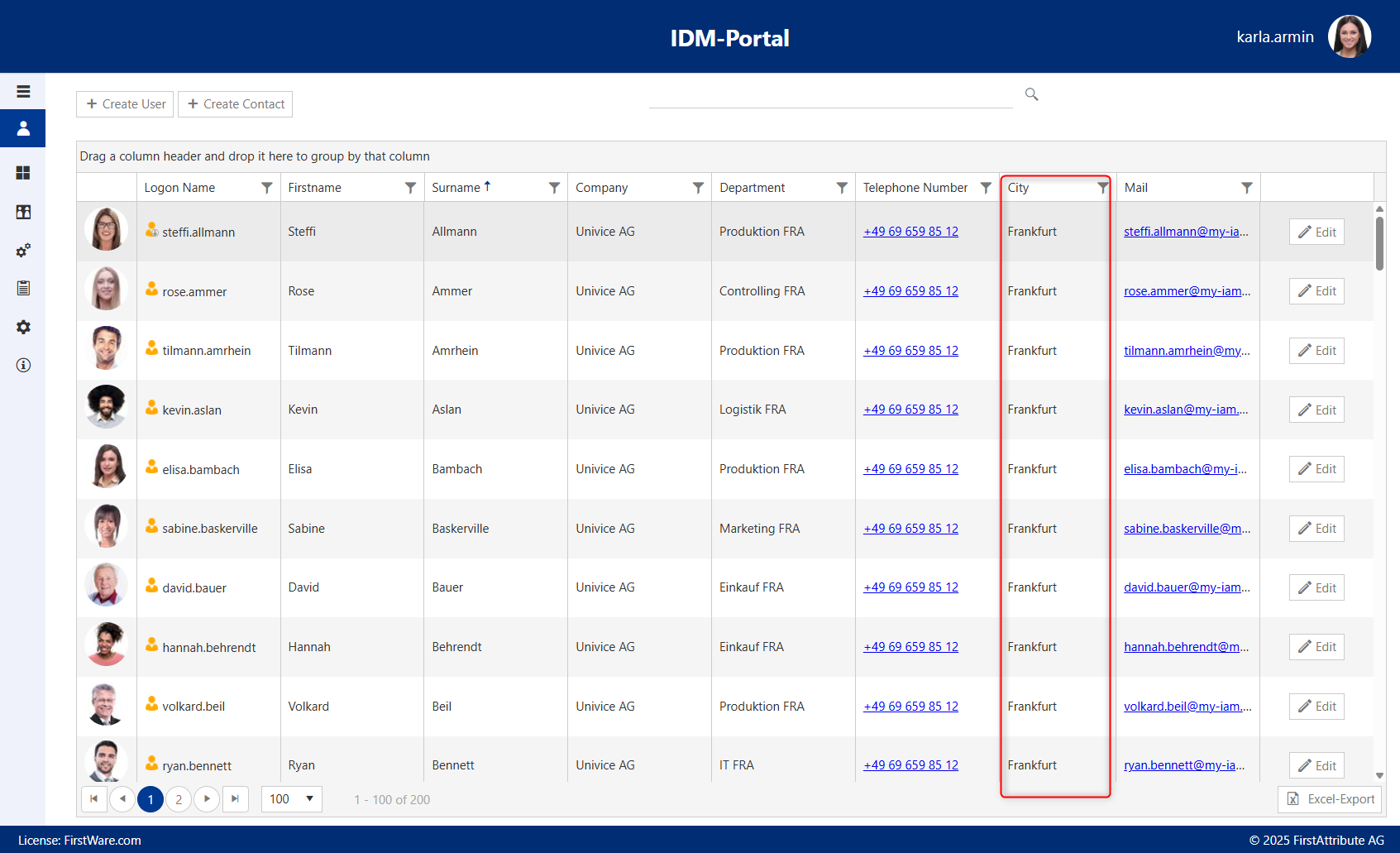
Roles are assigned based on attributes
Attributes such as location, company, organizational unit, area of responsibility, or job function provide the basis for role assignment.
For example, a person (such as a helpdesk employee) with the attribute “Company A” and the area of responsibility “Local IT” receives a role that allows them to manage identities at Company A. They can change specific attributes and run defined standard processes. They have no access to identities at other companies or to central configurations.
The IDM-Portal then automates the technical implementation.
Three clearly defined roles
The project included roles such as the following:
| Role | Assigned to | Permitted tasks | Not permitted |
|---|---|---|---|
| Location administrator | Regional IT unit responsible for defined companies or locations | Manage identities and defined attributes within their area of responsibility; carry out onboarding, maintenance, and offboarding | Permissions to other locations or central structures |
| Helpdesk employee | Central service desk | Start selected standard processes, such as password resets, account activation, or defined changes | Unrestricted identity management or extensive administrative rights |
| Local IT department | IT department of an individual company | Manage identities and selected attributes for their own company; maintain defined groups | Permissions to other companies or changes to the overarching permissions structure |
A. Location administrator
The location administrator manages identities within a clearly defined regional or organizational area of responsibility.
For example, they can:
- create new employees,
- maintain existing identities,
- change defined attributes,
- carry out offboarding processes,
- manage specific group memberships.
However, they cannot access other locations or change the overall permissions structure.
B. Helpdesk employee
The helpdesk has access to selected standard processes without receiving extensive administrative rights.
For example, a helpdesk employee can:
- reset a password,
- unlock an identity,
- run a defined standard process,
- check the status of an identity.
However, they cannot change arbitrary attributes, assign roles, or make extensive changes to groups or structures.
C. Local IT department
Local IT can continue to work independently within its own company. It can manage assigned identities and carry out defined tasks.
At the same time, local administrators are prevented from accessing other companies or changing central structures and permissions management policies.
How delegation and RBAC work together
The combination of delegation and RBAC provides the foundation for manageable permissions management.
Delegation: What can an administrator do in the IDM-Portal?
The delegation role defines which administrative rights and actions an administrator has in the portal—in other words, which identities they can view, which attributes they can change, and which processes they can run.
For example, the “Local Identity Administrator” role can view identities at their own company, change specific attributes, and manage defined groups.
RBAC: Which target-system permissions are automatically assigned to an employee?
RBAC defines which specific permissions in connected target systems—such as Entra ID group memberships or access to business applications—are automatically associated with an employee’s business role. If an administrator changes an attribute such as department or job title, the assignments are automatically recalculated.
For example, when an employee is promoted to manager, this automatically triggers a new set of permissions: new group memberships and licenses are assigned, while permissions that are no longer needed are automatically revoked.
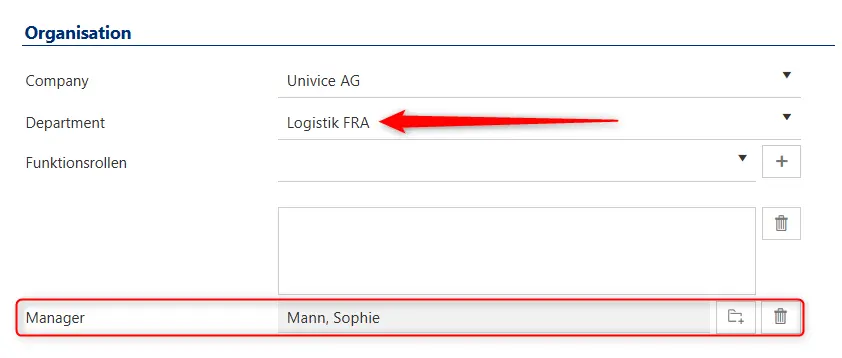
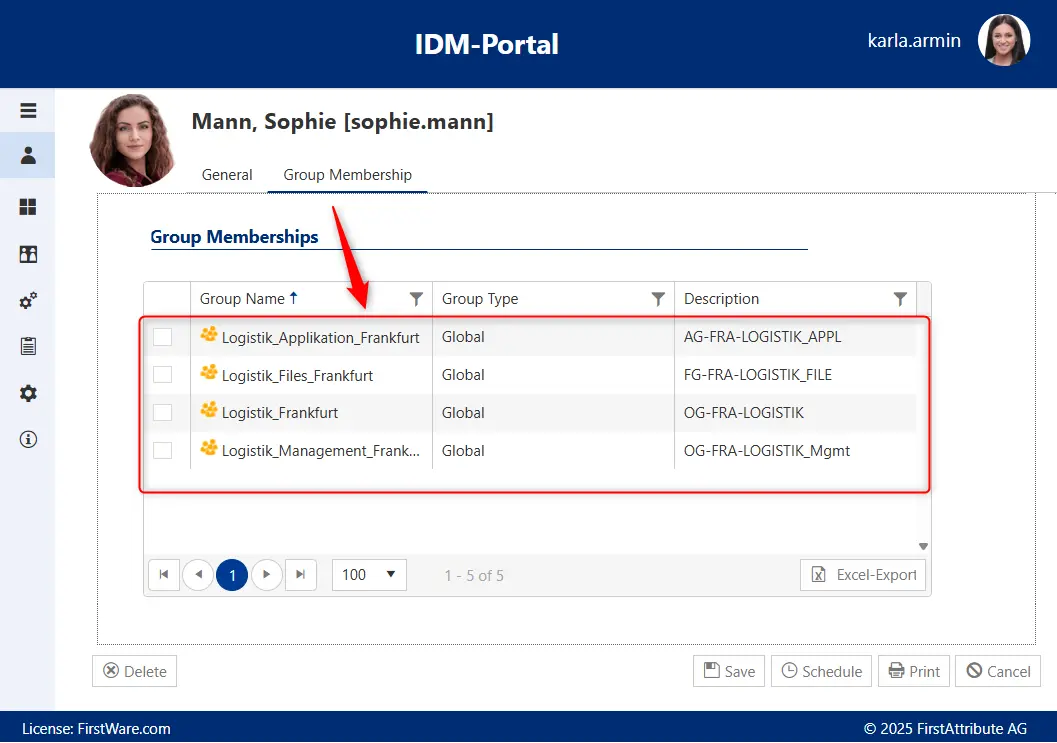
Automated access management with the FirstWare IDM-Portal
This combination eliminates the need to assign permissions individually to administrators or end users. At the same time, administrative rights and access rights remain limited to each person’s actual area of responsibility.
Compliance and governance: Benefits of transparent permissions management
Transparent permissions management makes access reviews easier, supports audits, and clarifies responsibilities.
The IDM-Portal can document which role a person holds, which attributes led to the role being assigned, which identities and objects they can access, which attributes they can change, which processes they can run, when changes were made, and which permissions were in place at a given time.
This turns access rights that have accumulated over time into traceable assignments:
Person or attribute → role → permitted action → affected identity or resource
This clarifies responsibilities, makes regular permissions reviews easier, and reduces unnecessary full access. Administrative changes are also documented in an audit-ready manner, duties are separated in a controlled way, and audits can be prepared much more efficiently.
Importantly, this does not just document that a role exists. It also makes it possible to trace exactly what that role was permitted to do.
Fine-grained permissions across different target systems
Many identity systems and directory services do not adequately support complex organizational structures and delegated responsibilities. The FirstWare IDM-Portal therefore provides a system-independent management layer, where permissions can be defined according to users’ actual tasks—for example, managing specific identities, attributes, groups, or processes.
This makes it possible to assign fine-grained rights even when the connected target system itself supports only broad permission levels. As a result, business access rules remain independent of the technical capabilities of each system.
Results: Consistent permissions across decentralized structures
The new permissions management system gives the group’s 63 subsidiaries clear areas of responsibility and reduces unnecessary full access. Permissions are no longer controlled solely through legacy groups or technical administrator roles. Instead, the IDM-Portal reflects the business responsibilities of the companies, locations, and IT teams.
Onboarding and offboarding processes are more standardized. Administrative tasks can be delegated in a controlled way to local IT units or the central helpdesk. At the same time, central permission structures remain protected.
The next planned step is to delegate additional standard processes to the central helpdesk through further fine-grained roles. In the future, additional identity sources and HR systems are also expected to be connected, aligning roles and permissions even more closely with the company’s actual organizational structure.
Learn more about the FirstWare IDM-Portal
 The FirstWare IDM-Portal by FirstAttribute is a user-friendly IAM solution for automated provisioning and lifecycle management of all identities and groups in complex hybrid IT environments.